What Are Emissions Estimates?
Open Supply Hub has partnered with Climate TRACE to offer free CO₂e (carbon dioxide equivalent) emissions estimates for production locations. These estimates help you and your partners understand and calculate emissions across the supply chain.
CO₂e explained: This is a standardized measurement that converts all greenhouse gases (including methane and nitrous oxide) into their carbon dioxide equivalent based on their environmental impact over 100 years. On Open Supply Hub, this measurement is expressed as t CO₂e which shares the total greenhouse gas emissions expressed as metric tonnes of CO₂e.
How to Get Your Free Emissions Estimate
STEP 1: Claim Your Production Location
To receive an emissions estimate, you must first claim your production location profile on Open Supply Hub. Only owners, managers, authorized employees and authorized representatives of the parent company can submit this data during the claim process.
STEP 2: Complete the Environmental Data Section
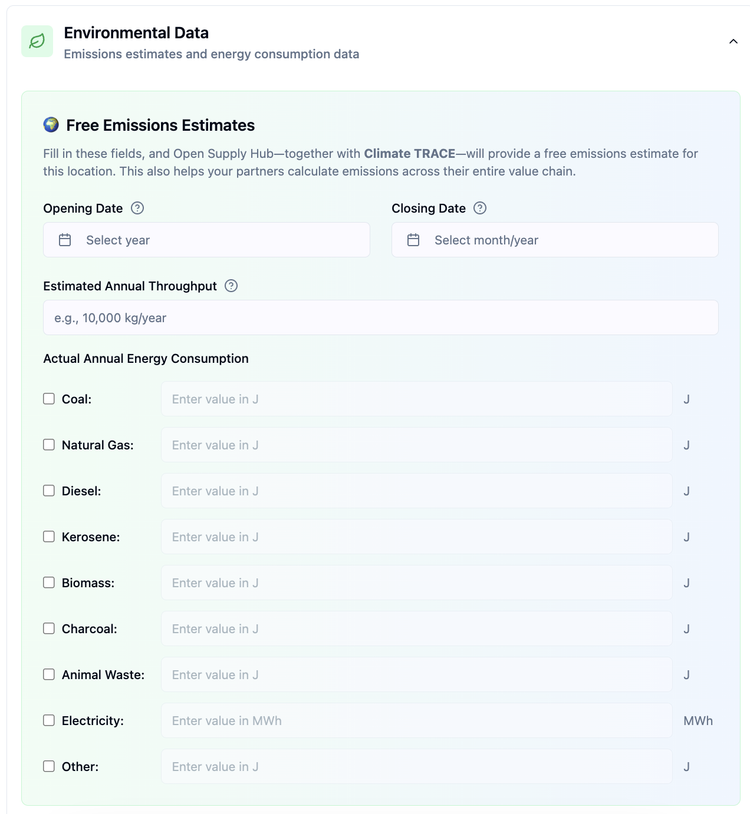
When claiming your profile, you will see an optional form called Free Greenhouse Gas (GHG) Emissions Estimates.
Fill in the following information:
Opening Date
- The year your production location officially started operations
- Select the year from the dropdown menu
Closing Date (if applicable)
- The date your production location permanently stopped operations
- Select the month and year
- Leave blank if still active
Estimated Annual Throughput
- The total amount of materials or products your production location processes in one year
- Enter the amount in kilograms (kg/year)
- Example: 10,000 kg/year
Actual Annual Energy Consumption
- The total energy your facility consumes in one year from all sources
- You can enter a mix of various energy sources with the checkbox selection:
- Fuels (Coal, Natural Gas, Diesel, Kerosene, Biomass, Charcoal, Animal Waste, Other): Enter values in joules (J)
- Electricity: Enter value in megawatt-hours (MWh)
Step 3: Submit Your Claim
Complete the rest of the claim form and submit. Your operational data will be reviewed along with your claim.
What Happens Next?
Timeline:
- Claim Approval: The OS Hub team reviews your claim within 10-14 business days
- Data Processing: Climate TRACE, a partnering organization, separately processes the environmental data at the end of each month
- Publication: After the claim is approved and Climate TRACE completes their data processing, emissions estimates appear on your production location's profile
Expected Timeline: Emissions estimates will be displayed on your profile approximately one to two months after submission, depending on when in the month you submit your claim and the review process.
What Appears on Your Profile:
Once published, your production location profile will show:
- Opening date and closing date (if applicable)
- Annual energy consumption (by fuel type)
- Estimated Emissions (in metric tons of CO₂e)
- Estimated Annual Activity (your throughput data)
- Data Source Attribution All estimated data will be labeled "From Climate TRACE"
Important: Emissions and energy consumption estimates will only appear on your profile after your claim is approved.

Have questions?
First, check out the FAQs below, we may have already answered your question! If you can't find what you need there, please reach out to support@opensupplyhub.org and we are happy to assist you.
Frequently Asked Questions
No, providing environmental data is completely optional. However, it helps you and your partners better understand your facility's environmental impact and supports supply chain transparency.
- Receive a free professional emissions estimate for your facility
- Help your partners calculate emissions across their entire value chain
- Demonstrate transparency and environmental responsibility
- Support global climate action efforts
Provide your best estimates. The form asks for estimated annual throughput for this reason—approximations based on your operational knowledge are acceptable.
- Joules (J): Most fuel suppliers can provide energy content in joules, or you can use standard conversion factors for your fuel type
- Megawatt-hours (MWh): Check your electricity bills, which typically show consumption in kWh or MWh (1 MWh = 1,000 kWh)
Yes, you can add or update your emission estimates at any time once you have claimed your production location's profile. Log into your OS Hub account, then go to My Account > My Facility and click on the location you would like to update. Scroll down to the 'Free Emissions Estimates' section and add the required information, then click 'Save'. Emissions estimates will be calculated and published on your profile within a month of submission.
Currently, there is no automatic email notification when emissions estimates are published to your profile. You can check your production location profile directly to see when the data appears.
Emissions estimates appear on your production location profile and are publicly visible, supporting transparency across the supply chain.
No, this is normal! Claim approval and emissions estimate publication happen on different schedules:
- Claim approval: is handled by the OS Hub team and can take up to 10-14 business days
- Emissions estimates: are calculated by Climate TRACE and can take up to one month to display on your profile
Once your claim is approved, your operational data (opening date, throughput, energy consumption) will appear on your profile immediately. The emissions estimate will be added later—typically within one month of your original submission. If more than one month has passed since you submitted your claim, please contact OS Hub support.